A Caesar cipher wheel is a two-ring paper disc that turns letter-shifting into a physical dial: line the outer ring (your plaintext letters) against the inner ring (the ciphertext), and every letter is encoded or decoded by reading straight across. To use one, print the template below, cut out the inner disc, pin both discs through the center, and rotate the inner ring so your key letter lines up — then read plaintext on the outside and ciphertext on the inside. It is the same math as the Caesar cipher tool, done by hand, and it is the fastest way to see why the alphabet "wraps around."
TL;DR
- What it is: two alphabet rings pinned at the center — outer ring = plaintext, inner ring = ciphertext.
- Set the key: rotate the inner disc so plaintext
Apoints to the letter you want as your shift (e.g. line A to D for shift 3). - Encode: find each letter on the outer ring, read the letter directly inside it.
- Decode: reverse it — find the ciphertext letter on the inner ring, read the plaintext outside it.
- Print it: the black-on-white template below works on any home printer; no color needed.
The Printable Caesar Cipher Wheel
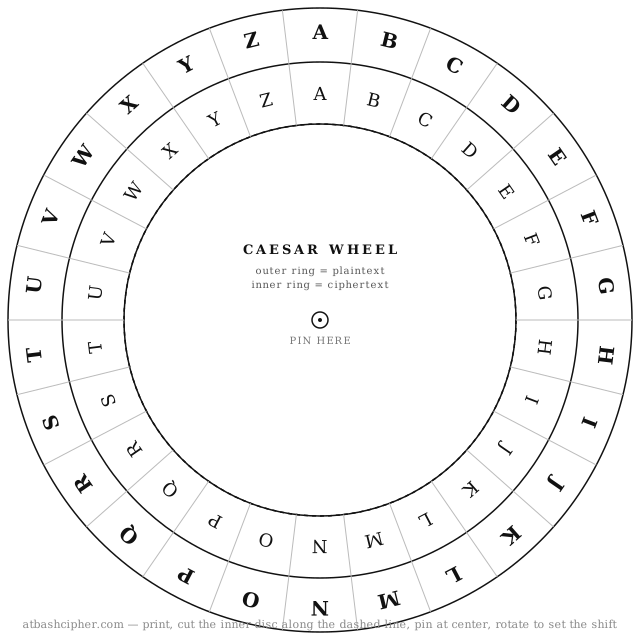
Open the full-size wheel (SVG) and print it directly from your browser, or right-click to save it. Because it is a vector file, it stays sharp at any print size — A4, US Letter, or a small card.
How the Caesar Cipher Wheel Works
The wheel has two concentric alphabets. The outer ring is fixed and represents your plaintext — the real message. The inner ring rotates and represents the ciphertext — the scrambled output. Both rings are the full alphabet A to Z in order, so the only variable is how far you turn the inner ring. That turn amount is the key, also called the shift.
When both rings are aligned (A over A), the shift is 0 and nothing changes. Rotate the inner disc one notch and you have shift 1; three notches gives the classic shift 3 that Julius Caesar reportedly used. Every letter is transformed by the same amount, which is exactly what makes it a substitution cipher rather than a rearrangement.
How to Make and Assemble the Wheel
- Print the template above on plain paper or, for durability, card stock.
- Cut around the outer edge so you have the full disc.
- Cut out the inner disc along the dashed circle. This is the piece that will rotate.
- Stack the inner disc back onto the outer ring, matching centers.
- Push a split-pin (brad) or thumbtack through the center dot marked PIN HERE so the inner disc can spin freely.
No printer handy? You can draw the same thing with a compass: two circles, 26 evenly spaced letters on each (one letter every ~13.85 degrees), pinned at the center.
How to Encode a Message With the Wheel
Say you want to encrypt HELLO with a shift of 3.
- Set the key. Rotate the inner disc so the outer
Alines up with the innerD. That is shift 3 (A → D). - Encode letter by letter. Find each plaintext letter on the outer ring and read the letter directly inside it:
- H → K
- E → H
- L → O
- L → O
- O → R
- Result: HELLO becomes KHOOR.
Notice what happens near the end of the alphabet. With shift 3, the outer X lands on the inner A — the ring "wraps around" past Z back to the start. That wraparound is modular arithmetic made visible, and it is the single idea beginners most often get wrong on paper. The wheel removes the guesswork because the letters are already arranged in a circle.
How to Decode a Message With the Wheel
Decoding is the same wheel, read in the opposite direction. Keep the same key (A lined up with D for shift 3), then find each ciphertext letter on the inner ring and read the plaintext outside it. Decoding KHOOR:
- K → H
- H → E
- O → L
- O → L
- R → O
You are back to HELLO. Encryption and decryption are inverse operations on the exact same dial — you never need a second wheel, just a different reading direction.
Worked Example: A Full Phrase
Longer messages work the same way; only letters shift, while spaces and punctuation are left in place so the message stays readable. Encrypting ATTACK AT DAWN with a shift of 5 (line outer A to inner F):
| Plaintext (outer) | Ciphertext (inner) |
|---|---|
| ATTACK | FYYFHP |
| AT | FY |
| DAWN | IFBS |
The full ciphertext is FYYFHP FY IFBS. Rotate the wheel back to the same shift 5 and read it inside-to-out to recover the original phrase. You can confirm any result instantly with the Caesar cipher tool.
Using the Wheel for ROT13 and Other Shifts
The wheel handles every Caesar variant, because a variant is just a different rotation. The most famous one is ROT13 — a shift of 13. Because 13 is exactly half of 26, ROT13 is its own inverse: encoding HELLO gives URYYB, and encoding URYYB again returns HELLO. On the wheel, a shift of 13 puts every letter directly across the circle from its partner. If you want the background on why that property is so useful, see ROT13 explained.
To switch keys, just spin the inner disc to a new alignment. That flexibility is also the cipher's weakness: there are only 25 meaningful shifts, so anyone can try them all. Comparing Caesar with a mirrored alphabet like the Atbash cipher — which you can test on the Atbash tool — makes the differences between shifting and reflecting the alphabet obvious.
Common Mistakes to Avoid
- Shifting the wrong ring. Encode by reading from outer to inner; decode from inner to outer. Mixing them flips your shift direction.
- Forgetting the wraparound. After Z, the ring continues at A. The wheel does this for you, which is its whole point.
- Shifting spaces or numbers. Standard Caesar usage shifts letters only; leave spaces and punctuation untouched.
- Losing your key. The message is only recoverable if the reader knows the shift. Agree on it in advance.
Why Use a Physical Wheel at All?
A wheel is slower than software, and that is the point. For classrooms, escape rooms, scout activities, and puzzle design, the tactile dial teaches the mechanics — keys, inverse operations, and modular wraparound — better than a black-box tool does. Once the concept clicks, the online Caesar cipher tool is there for speed, and the cryptography glossary connects these basics to the larger vocabulary of the field. If you want a step-by-step walkthrough without the wheel, see how to use the Caesar cipher step by step.
FAQ
1. Which ring is plaintext and which is ciphertext?
On this template the outer ring is plaintext (your real message) and the inner ring is ciphertext (the scrambled output). To encode, read from the outer ring inward; to decode, read from the inner ring outward.
2. How do I set the shift on the wheel?
Rotate the inner disc so plaintext A on the outer ring points at your chosen letter on the inner ring. Lining A to D sets shift 3, A to F sets shift 5, and A to N sets shift 13 (ROT13).
3. Do I need two wheels for encoding and decoding?
No. The same wheel does both. Keep the same alignment and simply reverse the reading direction — outer-to-inner to encode, inner-to-outer to decode.
4. What happens to letters near the end of the alphabet?
They wrap around. With a shift of 3, X becomes A, Y becomes B, and Z becomes C. Because the alphabet is arranged in a circle on the wheel, the wraparound is automatic.
5. Can the wheel do ROT13?
Yes. ROT13 is a Caesar cipher with a shift of 13, so set the wheel to A-over-N. Since 13 is half of 26, applying it twice returns the original text.
6. Is a message made with a Caesar wheel secure?
No. There are only 25 usable shifts, so the cipher is trivial to break by trying them all, and letter-frequency patterns survive encryption. It is excellent for learning and puzzles, but not for protecting real secrets.
Final Takeaway
A Caesar cipher wheel turns letter-shifting into something you can hold and spin: outer ring for plaintext, inner ring for ciphertext, one rotation to set the key. Print the template, pin it, and encode a short word like HELLO at shift 3 to feel the wraparound firsthand. Once the mechanics are second nature, verify your work with the Caesar cipher tool and branch out to the Atbash and Vigenere ciphers to see how classical cryptography grows more complex.